Built for travelers in China
Translate any Chinese app into English
Taobao, Alipay, Ctrip, DiDi, WeChat mini programs. Drag the lens over the text, tap to translate.

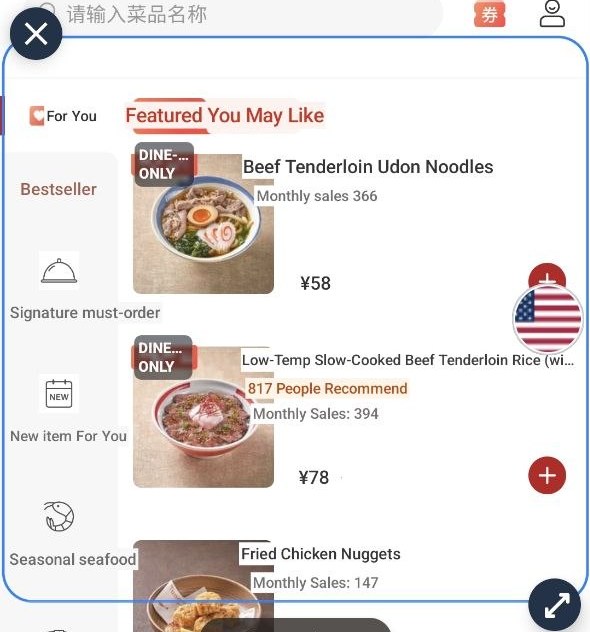
How it works
Start aharoam and allow screen sharing.
Open the app.
Drag the lens using the blue circle.
Tap the blue circle to translate.
Tap again to see the original and navigate.


Built to work natively inside the Chinese apps
Not a dictionary. aharoam understands the Chinese internet and helps you navigate it.
Text inside images
Reads the picture-based product descriptions in Chinese.
Mini apps
WeChat, Taobao, DiDi, Meituan.
No VPN
aharoam works natively on Chinese mobile networks.
Private
aharoam does not store your private data.
Pricing
No account needed.
China Travel Blog
The things nobody explains before you go.
Ordering food when the menu is only Chinese
QR menus, the ordering mini program, and how to say no to coriander.
Getting aroundHailing a taxi with DiDi
Setting it up with a foreign card, and what the driver's messages mean.
DrivingRenting a car and the license problem
Why your license is not valid, and the temporary permit that is.
Questions
What does it cost?
The first 50 translations are free. After that it is $9.99 for 7 days, or $24.99 for 30 days. Both are a single payment and neither renews.
Do I need a VPN?
No. aharoam works on Chinese wifi and Chinese SIM cards.
Does Google Translate work in China?
Not for the parts you need. Google closed its mainland service in 2022, so live text, camera, voice and conversation all fail on a Chinese network without a VPN. Offline packs still work if you download them before you fly, but they cannot translate a running app on screen.
Does aharoam see everything on my screen?
It reads only what is inside the lens box you position. That text is sent to be translated but it is never stored on our servers. Images never leave your phone. We use zero data retention but we recommend that you keep the lens away from passwords and card numbers.
Which apps does it work in?
Any Android app. It reads the screen itself, so it does not matter whether the text is a button, a photo, or a mini program inside WeChat or Alipay.
Do I need an account?
No. There is no sign-up and nothing to log into.
Does it work offline?
Screens you have already translated come back instantly with no connection. New text needs the internet.
Will it drain my battery?
The lens only reads the screen at the moment you tap. Between taps it does nothing.